The best IPTV players for Apple TV in 2026
By the Supernova developer · · 8 min read
Looking for an app to watch your IPTV playlist on Apple TV? There are dozens on the App Store, and many of them look alike. This guide narrows it down to six players that are actively maintained, available on Apple TV and clear about what they do.
One thing first: every app in this list is a player. None of them provides channels, movies or a subscription. You add your own M3U playlist or Xtream account, from a source you are authorised to use, and the app organises and plays it.
How to choose an IPTV player for Apple TV
- Your source format. Most providers give either an M3U playlist URL or Xtream login details (server, username, password). All six apps read M3U; check Xtream support if that is what you have.
- The devices you own. Some apps only run on Apple TV, iPhone and iPad. On a Mac, some are full Mac apps while others are iPad apps that run on Apple silicon Macs (“Designed for iPad” on the App Store).
- Sync between devices. If you switch between Apple TV and iPhone, iCloud sync of favourites and watch progress saves a lot of time. Check whether it is free or part of a paid plan.
- TV guide and catch-up. The guide (EPG) and replay only work if your source supplies them. A player can display them nicely, but it cannot create them.
- The pricing model. Free tiers vary a lot: some limit playback, others limit the number of playlists or extra features. Monthly, yearly and lifetime options also differ.
- System requirements. Recent apps sometimes require the latest tvOS or iOS. Check the compatibility section of the App Store page if your Apple TV is older.
Supernova (our app)
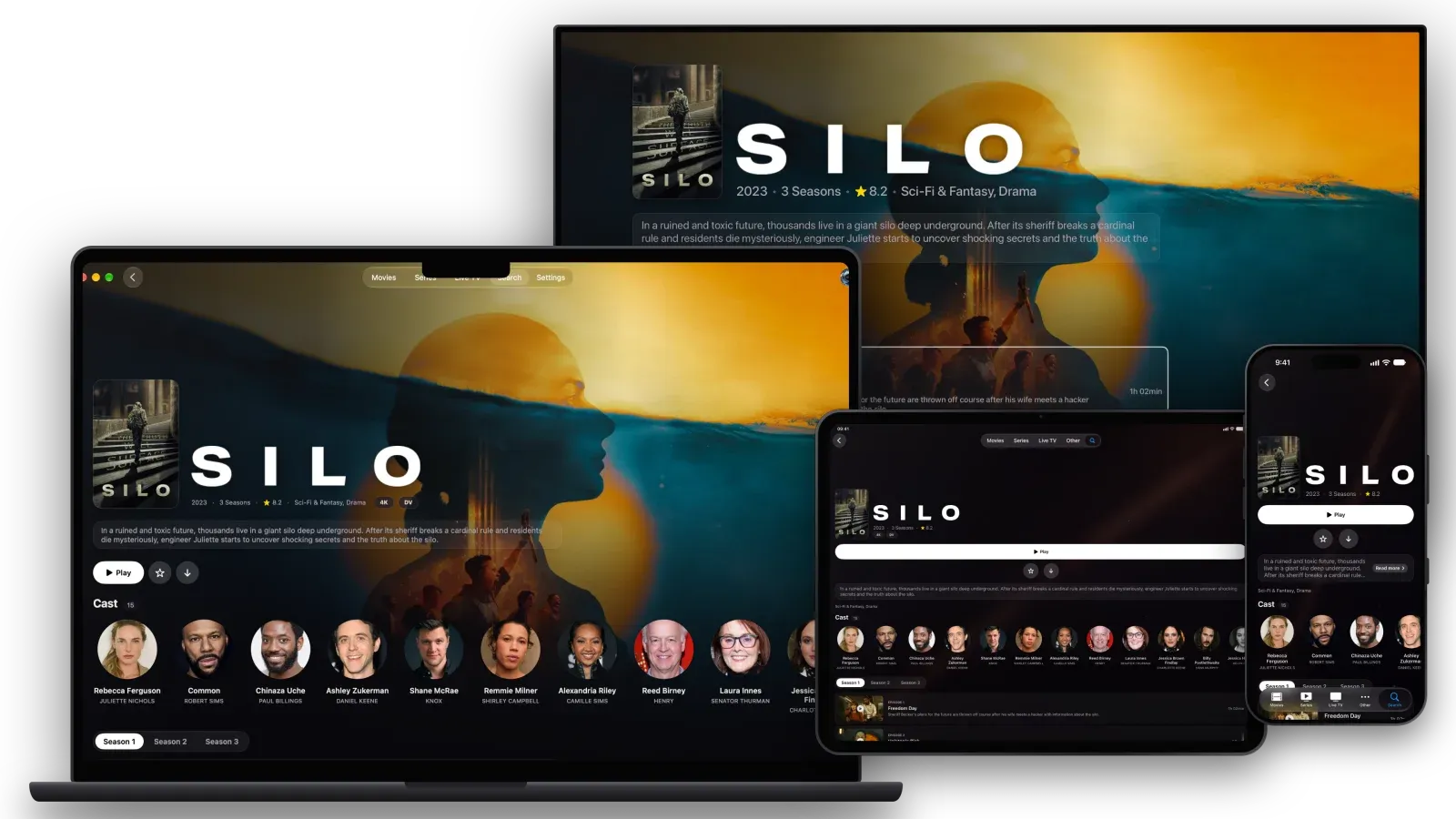
Supernova is the app we build: one app for iPhone, iPad, Apple TV and Mac. Playback is free, and a single Premium subscription works on all your devices with the same Apple account. On Apple TV, it is also built to get the most out of a 4K HDR TV and a home cinema system.
Picture and sound on Apple TV
On Apple TV, Supernova plays with NovaEngine, our own playback engine built on FFmpeg and Apple’s hardware decoders. It was written for big files and premium formats:
- Real Dolby Vision, when your Apple TV and your TV support it: profiles 5, 8.1 and 8.4 are played natively, and profile 7 (the dual-layer format of UHD Blu-ray remuxes) is converted to profile 8.1 on the fly, the same way the reference tool
dovi_tooldoes. If your TV can’t show Dolby Vision, Supernova falls back to the HDR10 base layer instead of failing. - HDR10, HDR10+ and HLG, detected and shown on screen, and Apple TV’s “Match Dynamic Range” setting is respected.
- Dolby Atmos: Dolby Digital and Dolby Digital Plus tracks are passed through untouched, so Atmos objects reach your receiver or soundbar. Dolby TrueHD and DTS tracks are decoded to multichannel audio up to 7.1.
- Modern codecs: HEVC, H.264 and even AV1, decoded by the chip when your Apple TV supports it, otherwise in software, with a warning if yours can’t keep up.
- 4K remuxes at high bitrates, with a large read-ahead buffer (around 9 seconds of a 60 Mb/s stream) to absorb network hiccups.
- Technical badges in the player (resolution, codec, frame rate, Dolby Vision or HDR format), so you know exactly what you are watching.
Three engines are available on Apple TV (Apple’s player, VLC and NovaEngine): you pick one for live TV, movies and series, and replay, and Supernova can fall back to VLC automatically if a stream misbehaves. On iPhone, iPad and Mac, it uses Apple’s player and VLC. More details in our guide to Dolby Vision, HDR10+ and Atmos on Apple TV.
The rest of the app
- Platforms: iPhone, iPad, Apple TV and a native Mac app. Requires iOS, iPadOS, tvOS or macOS 26 or later.
- Sources: M3U playlists (by URL) and Xtream accounts.
- Free: unlimited playback of live TV, movies, series and replay, with iCloud sync of profiles, favourites and progress, Top Shelf on Apple TV and one account or playlist.
- Premium: $1.99 per month with a one-week free trial, $17.99 per year, or $29.99 per year for Family (up to 6 members). Premium adds more accounts and playlists, multiview on Apple TV, Picture in Picture, offline downloads, Chromecast and actor filmographies.
- Also: movie and series pages with posters, plots and cast from TMDB, even for M3U playlists; an interface designed for the Siri Remote; profiles for the whole family; six languages.
- Good to know: it is a young app with few App Store ratings so far, and it needs the latest Apple systems (tvOS 26 or later).
- Best for: people who care about picture and sound quality on Apple TV, and want the same polished app on all their Apple devices, with free playback.
See Supernova on the App Store
The other players, in alphabetical order
IPTVX
On the App Store since 2019, IPTVX is one of the most complete IPTV players for Apple devices.
- Platforms: iPhone, iPad, Apple TV; on Mac, the iPad app runs on Apple silicon.
- Sources: Xtream, M3U and M3U8, plus Plex and SMB shares.
- Strengths: Dolby Vision, HDR10 and HLG support, multi-screen, EPG grid, catch-up, Picture in Picture, parental control, offline mode on iOS and iCloud sync.
- Price: free download; “FULL” plans from $3.99 per month or $28.99 per year, with a Family Sharing yearly plan at $56.
- Best for: users who want a long-established app with a very wide feature set and don’t mind its pricing.
NowSeen
NowSeen arrived on the App Store in July 2026 and mixes IPTV with personal media servers.
- Platforms: iPhone, iPad, Apple TV (tvOS 26 or later); on Mac, the iPad app runs on Apple silicon.
- Sources: M3U, Xtream, Plex, Jellyfin and Emby.
- Strengths: a four-channel multiscreen view, profiles with PIN, a programme guide with reminders, catch-up, Top Shelf on Apple TV, iCloud sync and Trakt or Simkl integration.
- Price: live TV is free; Premium is $1.99 per month, $17.99 per year or $44.99 lifetime, with Family plans.
- Best for: people who also run a Plex, Jellyfin or Emby server and want everything in one app.
Perfect IPTV Player
A long-standing player (since 2020) focused on format and protocol coverage.
- Platforms: iPhone, iPad, Apple TV and a Mac version (macOS 26 or later).
- Sources: M3U and XSPF playlists, Xtream Codes API, XMLTV guides (including GZIP).
- Strengths: many network protocols and streaming formats (HTTP, RTSP, RTMP, UDP, HLS, MPEG-DASH and more).
- Price: free download; $4.69 per month, $16.99 for 6 months, $20.99 per year or $34.99 lifetime.
- Best for: technical users with unusual stream types, and anyone who prefers a lifetime purchase.
Smarters Player Lite
The most rated app of this list on the US App Store, with a deliberately simple approach.
- Platforms: iPhone, iPad, Apple TV (tvOS 12 or later); on Mac, the iPad app runs on Apple silicon.
- Sources: M3U and JSON playlists, as well as local media.
- Strengths: simple to set up, and its low tvOS requirement makes it an option for older Apple TV models.
- Price: free download, with a one-time “Premium Version” purchase at $1.99.
- Best for: a basic, inexpensive player, especially on an older Apple TV. Note that the app is available in English only.
UHF
UHF, made by a small team in Spain, stands out for what it includes for free.
- Platforms: iPhone, iPad, Apple TV (tvOS 17 or later); on Mac, the iPad app runs on Apple silicon.
- Sources: M3U8, Xtream, Plex, Jellyfin and Emby.
- Strengths: free search, touch-friendly TV guide, catch-up, Picture in Picture, downloads and Chromecast; 4K HDR, Dolby Vision and Dolby Atmos; Trakt; recordings through its free UHF Server companion app.
- Price: free; the optional PRO plan ($1.99 per month, $17.99 per year or $49.99 lifetime) adds multi-device sync, removes ads and watermarks, and unlocks an unlimited TV guide with alerts.
- Best for: people who want a capable free tier and are happy to pay later for sync.
Comparison table
All six apps run on iPhone, iPad and Apple TV. The Apple TV column shows the minimum tvOS version required.
| App | Apple TV | Mac | Sources | Free tier | Paid options (US) |
|---|---|---|---|---|---|
| Supernova | tvOS 26+ | Mac app (macOS 26) | M3U, Xtream | Unlimited playback, 1 playlist | $1.99/mo, $17.99/yr, Family $29.99/yr |
| IPTVX | tvOS 16+ | iPad app (Apple silicon) | Xtream, M3U, Plex, SMB | Free download | From $3.99/mo, $28.99/yr |
| NowSeen | tvOS 26+ | iPad app (Apple silicon) | M3U, Xtream, Plex, Jellyfin, Emby | Live TV | $1.99/mo, $17.99/yr, $44.99 lifetime |
| Perfect IPTV Player | tvOS 16+ | Mac app (macOS 26) | M3U, XSPF, Xtream | Free download | $4.69/mo, $20.99/yr, $34.99 lifetime |
| Smarters Player Lite | tvOS 12+ | iPad app (Apple silicon) | M3U, JSON | Free download | $1.99 one-time |
| UHF | tvOS 17+ | iPad app (Apple silicon) | M3U8, Xtream, Plex, Jellyfin, Emby | Core features | $1.99/mo, $17.99/yr, $49.99 lifetime |
What about Infuse? Infuse is an excellent video player on the same Apple devices, but its App Store description focuses on video files, network shares and media servers such as Plex, Emby and Jellyfin, not on M3U playlists or Xtream accounts. That is why it isn’t in this list.
FAQ
Do these apps include TV channels?
No. They are players only. You need your own M3U playlist or Xtream account from a source you are authorised to use. A paid plan in a player unlocks app features, never content.
M3U or Xtream: which should I use?
Use the format your source gives you. An M3U playlist is a single URL; an Xtream account uses a server address, a username and a password. With Xtream, apps can usually load movies, series and the guide in a more structured way.
Is there a free IPTV player for Apple TV?
Several apps have a real free tier: Supernova plays everything for free with one playlist, UHF keeps its core features free, and NowSeen lets you watch live TV for free. Paid plans add sync, more playlists or extra features depending on the app.
Which app works on an older Apple TV?
Check the compatibility section of each App Store page. In this list, Smarters Player Lite has the lowest requirement (tvOS 12), while Supernova and NowSeen need tvOS 26.